
Key facts
- Brand
- Roland
- Model
- C-190
- Documents
- 2
- Languages
- EN
- Last added
- 2012-08-10
Start here
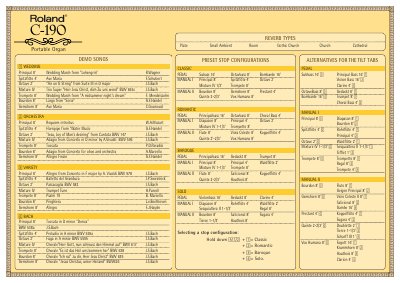
Roland C-190 Portable Organ Quick Operation Guide
This is a short quick operation guide for the C-190 portable organ. It lists the demo songs together with their composers, the preset stop configurations (Classic, Romantic, Baroque and Solo) and the alternative ranks available for the tilt tabs, followed by a function/action table for everyday operation.
The function table explains how to play demo songs, select stops for the MANUAL I, MANUAL II and PEDAL divisions, split the keyboard, save and load registrations, record and play back, set transposition, master tuning and temperament, adjust the reverb type and level, and how to restore the C-190 factory settings.
Roland C-190 specifications
| Reverb types | Small Ambient, Room, Gothic Church, Church, Cathedral |
|---|---|
| Temperaments | Mean Tone, Pythagorean, Kirnberger, Werckmeister, Equal (default) |
| Registration banks | 2 banks, selected with [M 1/2] |
All Roland C-190 documents by type
Day-to-day operation, settings and troubleshooting. Start here if the product is already set up.
The shortest path to a working setup, usually only a few pages.
Questions answered in these manuals
How do I play a demo song on the C-190?
Press [REC] + [PLAY], then press [1], [2], [3] or [4] to choose the demo song.
How do I change the reverb type?
Press and hold [REVERB] and use [DOWN]/[UP] to select the type; use [DOWN]/[UP] again to change the reverb level.
What is the Roland C-190 designed for?
The C-190 is a portable organ with simulated two-manual functionality designed for religious congregations and other occasions requiring high-quality organ or orchestral music.
How can the keyboard be divided for playing?
You can split the 76-note keyboard into two sections called divisions to play the instrument like a two-manual organ.