
Key facts
- Brand
- Mitel
- Model
- 5330
- Category
- Telephone
- Industry
- Electronics
- Documents
- 10
- Languages
- EN
- Last added
- 2026-11-16
Start here
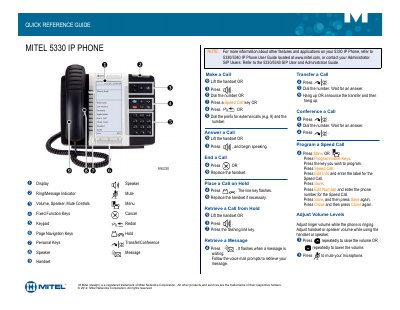
Mitel 5330 IP Phone Quick Reference Guide
The Mitel 5330 IP Phone Quick Reference Guide describes the basic operation of the Mitel 5330 IP Phone, including its display, keys, indicators, and controls.
It provides step-by-step instructions for making and answering calls, placing and retrieving calls from hold, retrieving messages, transferring and conferencing calls, programming speed calls, and adjusting volume and mute settings.
Mitel 5330 specifications
| Conference call participants | Up to eight (8) people |
|---|---|
| Call History capacity | 20 calls |
| Hold reminder | 1 minute, then rings back |
| Speed dial name length | 10 letters |
All Mitel 5330 documents by type
The shortest path to a working setup, usually only a few pages.
Day-to-day operation, settings and troubleshooting. Start here if the product is already set up.
- Mitel 5320/5330/5340 IP Phone Reference Guide 4 p
- Mitel 5330 and 5340 IP Phones User Guide 82 p
- Mitel 5330 IP and 5340 IP Phones User Guide 76 p
- Mitel 5320/5330/5340 IP Phone User Guide 106 p
- Mitel 5330 IP and 5340 IP Phones User Guide 66 p
- Mitel 5330 IP & 5340 IP Phones User Manual 66 p
- Mitel 5320/5330/5340 IP Phone User Guide 84 p
Questions answered in these manuals
How do I make a call on the Mitel 5330 IP Phone?
Lift the handset or press a line key, then dial the number or press a Speed Call key.
How do I transfer a call?
Press Transfer/Conference, dial the number, wait for an answer, then hang up or announce the transfer and hang up.
How do I make a call on the Mitel 5330e IP Phone?
Lift the handset or press the speaker key, then dial the number. You can also press a Speed Call key or dial an external-call prefix and the number.
How do I transfer a call?
Press the transfer/conference key, dial the number and wait for an answer. Then hang up, or announce the transfer and hang up.
How do I make an external call on the Mitel 5320/5330/5340 IP phone?
Lift the handset if you want, then dial 8 plus the telephone number.
How many people can be in a conference call?
Up to eight people can participate in a conference call.