
Key facts
Start here
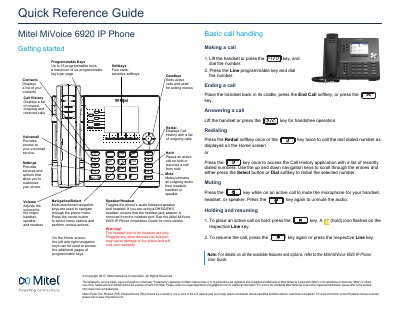
Mitel MiVoice 6920 IP Phone Quick Reference Guide
This quick reference guide explains how to use the basic features of the Mitel MiVoice 6920 IP Phone. It covers functions like volume control, muting, navigation, redialing, holding calls, and accessing call history and contacts. The guide also describes the user interface, including softkeys and status indicators. For full feature details, refer to the User Guide.
Read onlineMitel MiVoice 6920 IP Phone specifications
| Display | 3.5” QVGA (320x240) color TFT LCD display with brightness controls |
|---|---|
| Ethernet | Built-in two-port, 10/100/1000 Gigabit Ethernet switch |
| USB port | USB 2.0 port (100mA maximum) |
| Speakerphone | Enhanced wideband, full-duplex speakerphone |
| Programmable keys | Six programmable, multi-function, self-labeling keys |
| Power over Ethernet | PoE class 2 rating |
| Headset support | USB, DHSG/EHS, and wired analog headsets |
All Mitel MiVoice 6920 IP Phone documents by type
The shortest path to a working setup, usually only a few pages.
Day-to-day operation, settings and troubleshooting. Start here if the product is already set up.
Questions answered in these manuals
How do I mute a call on the Mitel MiVoice 6920?
Press the mute key while on an active call to mute the microphone for your handset, headset, or speaker. Press the key again to unmute the audio.
How do I place a call on hold?
To place an active call on hold, press the key. A (hold) icon flashes on the respective Line key.
What viewing angles does the phone stand support?
The stand supports two viewing angles, 30° and 60°.
Is the AC power adapter included with the phone?
No, the AC power adapter is sold separately.