
Mitel 5320/5330/5340 IP telephone reference guide covering buttons, placing calls, hold, transfer, conference, speed dial, call history and phone book.
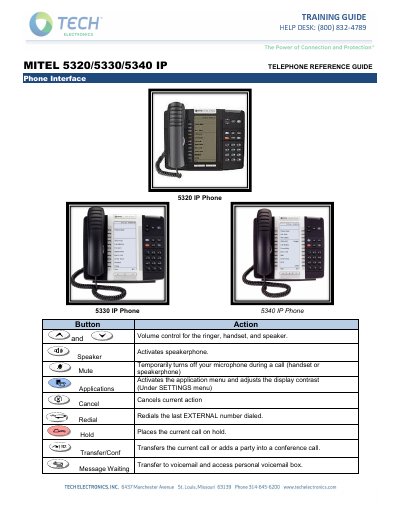
This reference guide describes how to use the Mitel 5320, 5330 and 5340 IP telephones. It explains the phone interface buttons and how to control the volume of the ringer, handset and speaker, then walks through everyday tasks such as placing internal and external calls, Do Not Disturb, holding and transferring calls, transferring to voicemail and setting up a conference.
| Conference call participants | Up to eight (8) people |
|---|---|
| Call History capacity | 20 calls |
| Hold reminder | 1 minute, then rings back |
| Speed dial name length | 10 letters |
Lift the handset if you want, then dial 8 plus the telephone number.
Up to eight people can participate in a conference call.
Press the DND key; the telephone will not ring and calls go straight to your personal mailbox. Press the DND key again to disable it.
Press the MESSAGE key, dial the desired extension number, then hang up.
Press the Blue Application Key, press the Superkey softkey, answer NO until Ringer Adjust appears, then choose Ringer Pitch and use the volume keys.