
Mitel 5330 IP Phone Quick Reference Guide with instructions for making, answering, holding, transferring, and conferencing calls.
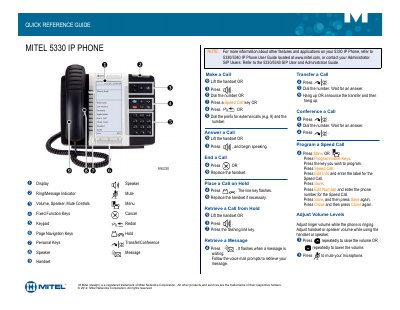
The Mitel 5330 IP Phone Quick Reference Guide describes the basic operation of the Mitel 5330 IP Phone, including its display, keys, indicators, and controls.
It provides step-by-step instructions for making and answering calls, placing and retrieving calls from hold, retrieving messages, transferring and conferencing calls, programming speed calls, and adjusting volume and mute settings.
Lift the handset or press a line key, then dial the number or press a Speed Call key.
Press Transfer/Conference, dial the number, wait for an answer, then hang up or announce the transfer and hang up.
Press the volume keys repeatedly to raise or lower the volume.
Refer to the 5330/5340 IP Phone User Guide at www.mitel.com or contact your Administrator.