
Key facts
- Brand
- KEYENCE
- Model
- KV-10
- Category
- Industrial Robot
- Documents
- 4
- Languages
- EN · ZH
- Last added
- 2023-10-17
Start here
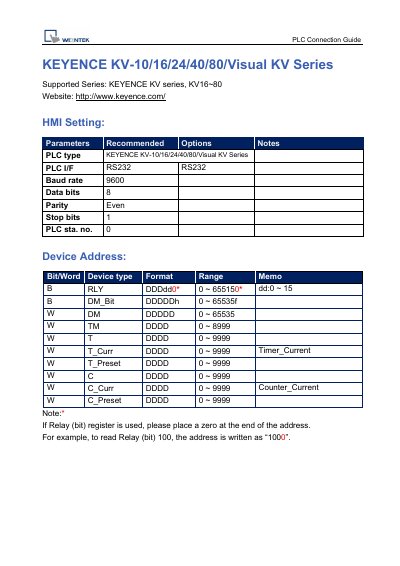
KEYENCE KV-10/16/24/40/80/Visual KV Series PLC Connection Guide
This document serves as a connection guide for KEYENCE KV Series PLCs (models KV-10, KV-16, KV-24, KV-40, KV-80, and Visual KV Series). It details the recommended RS232 communication settings, including a baud rate of 9600, 8 data bits, even parity, and 1 stop bit. The guide also specifies the PLC station number as 0.
Read onlineKEYENCE KV-10 specifications
| Communication speed | 9600, 8, Even, 1 (RS‑232) |
|---|---|
| Controller station number | 0 (one‑to‑one connection only) |
| Connector type | 9‑pin D‑sub male (RS‑232) |
| Document revision | V1.01, May 2011 |
All KEYENCE KV-10 documents by type
Day-to-day operation, settings and troubleshooting. Start here if the product is already set up.
Mounting, wiring and first power-up. Read it before the hardware goes in.
Questions answered in these manuals
What is the baud rate for RS232 communication?
The baud rate is 9600.
From: KEYENCE KV-10/16/24/40/80/Visual KV Series PLC Connection Guide
What is the data bits setting for RS232 communication?
The data bits setting is 8.
From: KEYENCE KV-10/16/24/40/80/Visual KV Series PLC Connection Guide
What is the default communication speed for the KV1000 HMI?
The default communication speed is 9600 baud, 8 data bits, even parity, 1 stop bit (RS‑232).
What controller station number should be used?
The controller station number is set to 0, and the protocol supports only a one‑to‑one connection.