
Key facts
- Brand
- KEYENCE
- Model
- KV-1000
- Documents
- 3
- Languages
- ZH
- Last added
- 2012-03-15
Start here
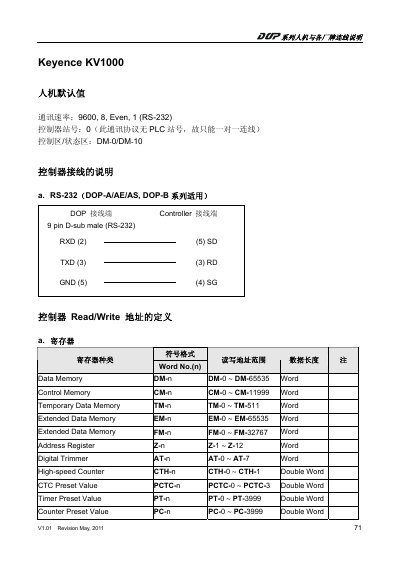
Keyence KV1000 HMI Connection Manual
The document explains how to connect the Keyence KV1000 human‑machine interface to various controllers using an RS‑232 serial link. It lists the default communication settings, controller station number, and the register address format used for read/write operations.
Included are the pinout for the 9‑pin D‑sub connector, definitions of data, control, temporary, and extended memory areas, as well as the format for relay and counter contacts. The revision information (V1.01, May 2011) is also noted. This manual is written in Chinese.
KEYENCE KV-1000 specifications
| Communication speed | 9600, 8, Even, 1 (RS‑232) |
|---|---|
| Controller station number | 0 (one‑to‑one connection only) |
| Connector type | 9‑pin D‑sub male (RS‑232) |
| Document revision | V1.01, May 2011 |
All KEYENCE KV-1000 documents by type
Day-to-day operation, settings and troubleshooting. Start here if the product is already set up.
Mounting, wiring and first power-up. Read it before the hardware goes in.
Questions answered in these manuals
What is the default communication speed for the KV1000 HMI?
The default communication speed is 9600 baud, 8 data bits, even parity, 1 stop bit (RS‑232).
What controller station number should be used?
The controller station number is set to 0, and the protocol supports only a one‑to‑one connection.