
Key facts
- Brand
- Fanvil
- Model
- X2P / X2C / X2CP
- Category
- Telephone
- Industry
- Electronics
- Documents
- 2
- Languages
- EN · ZH
- Last added
- 2026-11-16
Start here
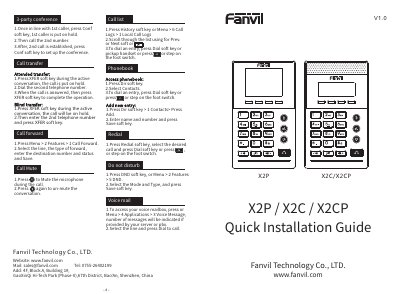
Fanvil X2P / X2C / X2CP Phone Quick Installation Guide
This is the Fanvil quick installation guide (V1.0) for the X2P, X2C and X2CP phones. It shows the box contents such as the Ethernet cord, stand, power adapter (optional on X2P or X2CP), headset and bracket, explains bracket installation, and describes how to connect the power adapter, network, PC, headset, monitor and foot switch to the matching ports.
The guide then explains configuration through the phone menus (network, accounts, language) and through a web browser using the phone's IP address with the default admin login. It also gives short step lists for everyday use: conference, attended and blind transfer, call forward, mute, call logs, phonebook, redial, DND, voice mailbox, making and answering calls, and hold/resume.
Fanvil X2P / X2C / X2CP specifications
| Default keypad unlock PIN | 123 |
|---|---|
| Default web login username and password | admin / admin |
| Advanced Settings default password | 123 |
| Network settings modes | DHCP / Static / PPPOE |
| Ports on the device | Power, PC, network, foot switch, headset, monitor |
| Power adapter availability | Optional on X2P or X2CP |
Source: Fanvil X2P / X2C / X2CP Phone Quick Installation Guide
All Fanvil X2P / X2C / X2CP documents by type
The shortest path to a working setup, usually only a few pages.
Day-to-day operation, settings and troubleshooting. Start here if the product is already set up.
Questions answered in these manuals
How do I set up a conference call on the phone?
While in line with the first caller, press the Conf soft key to put that caller on hold, call the second number, and press Conf again once the second call is established.
From: Fanvil X2P / X2C / X2CP Phone Quick Installation Guide
How do I unlock the keypad?
Long press the key lock key and enter the PIN to unlock; the default PIN is 123.
From: Fanvil X2P / X2C / X2CP Phone Quick Installation Guide
What power supply should be used with the phone?
Please use the external power supply that is included in the package. Other power supplies may cause damage to the phone.
Can the phone be used outdoors?
No, this phone is designed for indoor use only. Do not install the device in places where there is direct sunlight.