
Key facts
- Manuals
- 5
- Models
- 1
- Languages
- KO · EN · ZH
- Last added
- 2026-10-03
Fanvil models by category
Featured Fanvil manuals

Fanvil X3S IP Phone User Manual
This manual begins with safety precautions that must be read before installing or using the X3S phone. It explains proper power sources, handling, and environmental restrictions to prevent damage or injury.
The guide then covers product features, installation options (desktop or wall‑mount, PoE or external adapter), the keypad and screen interface, network and line configuration, call functions, advanced settings such as VPN, and troubleshooting tips. Appendices provide key icons, text entry tables, and LED status information. This manual is written in Korean.
Covers: Safety Precautions · Product Introduction · Installation · User Interface (UI) Guide · Settings · Phone Use
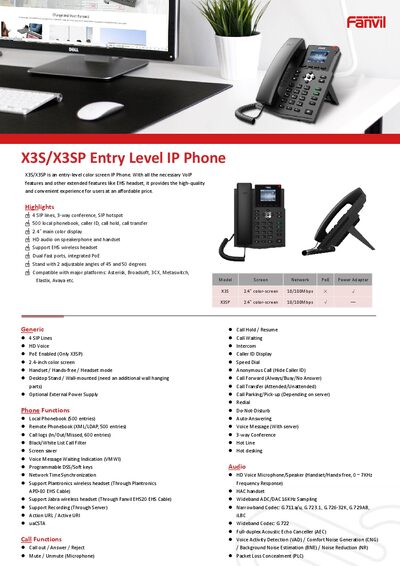
Fanvil X3S/X3SP Entry-Level IP Phone Product Specification Sheet
The Fanvil X3S/X3SP is an entry‑level color‑screen IP phone offering a full set of VoIP features, including 4 SIP lines, HD voice, and support for wireless headsets. It can be used on a desktop stand or wall‑mounted with optional accessories.
Key specifications include a 2.4‑inch (320×240) color display, dual Ethernet ports with PoE (X3SP only), a wide range of supported codecs, and robust network security features such as 802.1x, VPN, and VLAN. Physical dimensions, power consumption, and environmental ratings are also provided for installation planning.
Covers: Phone Functions · Audio Features · Network & Protocols · Physical Specifications · Installation Options

Fanvil C56/C56P VoIP Phone Quick Installation Guide
This Quick Installation Guide introduces the Fanvil C56/C56P VoIP phone, lists the items included in the package (handset, power adaptor G2, handset cord, base bracket, Ethernet cable) and shows the front view and keypad layout.
The guide walks you through connecting the phone, selecting network modes (Static, DHCP, PPPoE) via the keypad or web interface, configuring SIP settings, and making calls using either IP address or SIP number.
Covers: Package Contents · Product Appearance · Connecting the Phone · Network Mode Settings · Web Configuration · PPPoE Setting
Fanvil BW320 IP Phone User Manual
This manual introduces the Fanvil BW320 IP phone, covering safety precautions, package contents, and an overview of the device’s front panel and connectors. It guides users through power and network connection, quick setup, and detailed configuration via the phone’s menu and web interface.
The document also explains basic phone functions such as answering, dialing, call transfer, hold, and voicemail, and provides a full list of hardware, voice, network, and management specifications for the BW320 model. This manual is written in Chinese.
Covers: Safety Information · Package Contents · Device Overview · Installation and Power/Network Connection · Quick Setup · Basic Phone Operations
Latest Fanvil manuals
Fanvil X3S IP Phone User Manual
User Manual 87 pages · 2.8 MB · KOThe Fanvil X3S IP Phone User Manual provides safety instructions, installation steps, UI guide, and configuration settings for the device.
Fanvil X3S/X3SP Entry-Level IP Phone Product Specification Sheet
Product Leaflet 2 pages · 552 KB · ENThe Fanvil X3S/X3SP entry-level IP phone specification sheet details its features, network capabilities, and physical dimensions.
Fanvil C56/C56P VoIP Phone Quick Installation Guide
Quick Start Guide 10 pages · 1.8 MB · ENQuick Installation Guide for the Fanvil C56/C56P VoIP phone, covering setup, network configuration, and basic call functions.
Fanvil BW320 IP Phone User Manual
User Manual 65 pages · 1.5 MB · ZHThe Fanvil BW320 IP phone user manual provides safety guidelines, setup instructions, feature operation, and technical specifications.
Fanvil BW530 Manual
BW530 User Manual, introduces the product's safety requirements, packaging contents, appearance, button instructions, connection ports, starting use, telephone basic operations, page settings, etc.
Which document do I need?
User Manual
Day-to-day operation, settings and troubleshooting. Start here if the product is already set up.
Quick Start Guide
The shortest path to a working setup, usually only a few pages.
Questions answered in Fanvil manuals
How many SIP lines does the Fanvil X3S/X3SP support?
It supports up to 4 SIP lines.
From: Fanvil X3S/X3SP Entry-Level IP Phone Product Specification Sheet
Does the X3SP model support Power over Ethernet (PoE)?
Yes, PoE is enabled on the X3SP model only.
From: Fanvil X3S/X3SP Entry-Level IP Phone Product Specification Sheet
How do I make a call to an IP address?
Lift the handset or press the speaker, then enter the address in the format #IP# (e.g., #192.168.0.1#) to call the device at that IP.
What should I use for the power adapter?
Use the power adapter supplied with the BW320; using a non‑original adapter may damage the device.
How can I set the network mode to PPPoE?
Enter the menu, select the network settings, choose PPPoE mode, and enter your account and password as described in the manual.