
Key facts
- Brand
- Apple
- Model
- iPhone 6
- Category
- Smartphones
- Documents
- 4
- Languages
- EN · ES
- Last added
- 2026-10-15
Start here
Apple iPhone 6s/6s Plus/6/6 Plus/5s/5c/5/4s iOS 9.0 User Guide
This guide describes iOS 9.0 for iPhone 6s, iPhone 6s Plus, iPhone 6, iPhone 6 Plus, iPhone 5s, iPhone 5c, iPhone 5, and iPhone 4s. Features and apps may vary depending on the model, location, language, and carrier.
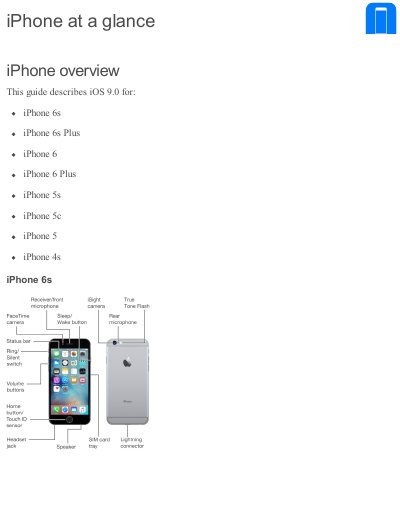
Included accessories include an Apple headset, a connecting cable, an Apple USB power adapter, and a SIM eject tool. The guide covers the Multi-Touch screen, 3D Touch, buttons such as Sleep/Wake and Home, volume controls, the Ring/Silent switch, the SIM card, and status icons.
Apple iPhone 6 specifications
| SIM card type (iPhone 4s) | Micro-SIM |
|---|---|
| SIM card type (iPhone 5 or later) | Nano-SIM |
| 3D Touch support | iPhone 6s and iPhone 6s Plus |
| Touch ID support | iPhone 5s or later |
| Apple Pay support | iPhone 6, iPhone 6 Plus, or later |
Source: Apple iPhone 6s/6s Plus/6/6 Plus/5s/5c/5/4s iOS 9.0 User Guide
All Apple iPhone 6 documents by type
Day-to-day operation, settings and troubleshooting. Start here if the product is already set up.
Questions answered in these manuals
Which iPhone models are supported by this guide?
This guide describes iOS 8.4 for the iPhone 6, iPhone 6 Plus, iPhone 5s, iPhone 5c, iPhone 5, and iPhone 4s.
From: Apple iOS 8.4 User Guide for iPhone 6/6 Plus/5s/5c/5/4s
Where can I find information about features available in my area?
You should visit the Apple website to check feature availability for your specific location.
From: Apple iOS 8.4 User Guide for iPhone 6/6 Plus/5s/5c/5/4s
What iPhone models does this manual cover?
It covers iPhone 6, iPhone 6 Plus, iPhone 5s, iPhone 5c, iPhone 5, and iPhone 4s.
From: Apple iPhone User Manual
Which iPhone models does this guide cover?
It covers iPhone 4s, iPhone 5, iPhone 5c, iPhone 5s, iPhone 6, and iPhone 6 Plus.
How do you lock the iPhone when it is not in use?
Press the sleep/wake button to lock the iPhone.