
Key facts
- Manuals
- 431
- Models
- 11
- Categories
- 22
- Languages
- EN · ZH
- Last added
- 2026-10-03
Apple models by category
Featured Apple manuals

Apple MacBook Pro User Guide
This guide walks new and experienced users through the initial setup of the MacBook Pro, including connecting the 85W MagSafe Power Adapter, configuring a user account, and customizing system preferences. It also provides detailed information on the laptop’s hardware features such as the keyboard, ports, Multi‑Touch trackpad, and battery management.
Later chapters cover troubleshooting, hardware upgrades like replacing the hard‑disk drive or adding memory, and how to access Apple support resources. Safety instructions and regulatory information are included at the end of the manual.
Covers: Ready, Set Up, Go · Life with Your MacBook Pro · Boost Your MacBook Pro · Problem, Meet Solution · Last, but Not Least · What’s in the Box
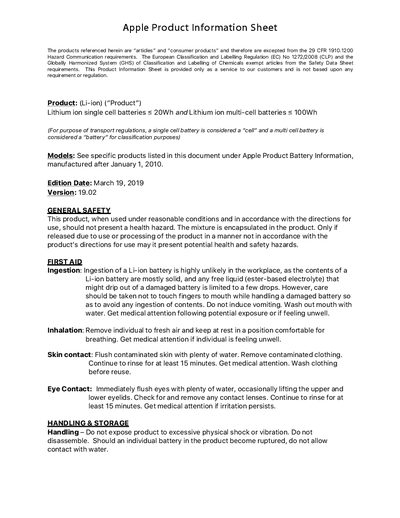
Apple Various Battery Product Information Sheet
The sheet outlines general safety, first‑aid, handling, storage, fire‑safety, disposal, and transportation requirements for Apple lithium‑ion batteries. It also lists the tests the batteries have passed, such as altitude simulation, thermal, vibration and shock tests.
Detailed tables list single‑cell (≤20 Wh) and multi‑cell (≤100 Wh) battery specifications for many Apple products, including model numbers, battery weight, watt‑hour rating and classification for air transport.
Covers: GENERAL SAFETY · FIRST AID · HANDLING & STORAGE · FIRE SAFETY · DISPOSAL · TRANSPORTATION
Apple Mac Pro User Guide
This guide walks you through preparing your Mac Pro, including opening the chassis, installing memory, internal storage devices, and PCI Express cards. It also explains the system’s hardware features such as the 64‑bit multicore processor, FB‑DIMM memory, and anodized aluminum construction.
Later chapters cover everyday use, software updates, networking, AirPort wireless, and detailed troubleshooting. Safety information, service resources, and an index are included to help you maintain and service the Mac Pro over its lifespan.
Covers: Ready, Set Up, Go · Life with Your Mac Pro · Making a Good Thing Better · Problem, Meet Solution · What's Under the Hood · Last, but Not Least
Apple MacBook Pro (Thunderbolt 3) Essentials User Manual
This guide covers everything you need to get started with a MacBook Pro that has Thunderbolt 3 ports. It explains how to set up the computer, use the Touch Bar, Touch ID, Force Touch trackpad, and built‑in accessories such as the 61 W or 87 W USB‑C Power Adapter. Detailed sections describe each pre‑installed app, iCloud integration, Apple Pay, AirDrop, and more.
The manual also includes safety and handling instructions, regulatory compliance details, and information on battery recycling, environmental initiatives, and how to obtain service or support from Apple.
Covers: MacBook Pro at a glance · Get started · Apps · Find answers · Safety, handling, and support · Touch Bar and Touch ID
Latest Apple manuals
Apple MacBook Pro User Guide
User Manual 88 pages · 3.7 MB · ENThe Apple MacBook Pro User Guide explains how to set up, use, and maintain your MacBook Pro, covering basic features, keyboard, ports, trackpad, battery…
Apple Various Battery Product Information Sheet
Product Leaflet 13 pages · 401 KB · ENThis Apple product information sheet provides safety guidelines, handling instructions, and detailed specifications for lithium‑ion batteries used in…
Apple Mac Pro User Guide
User Manual 120 pages · 7.2 MB · ENThe Apple Mac Pro User Guide provides setup instructions, feature overviews, troubleshooting tips, and maintenance information for the Mac Pro.
Apple MacBook Pro (Thunderbolt 3) Essentials User Manual
User Manual 72 pages · 30.6 MB · ENThe Apple MacBook Pro Essentials guide provides setup, hardware features, Touch Bar usage, accessories, safety, and support information for Thunderbolt 3…
Apple iPhone User Guide
User Manual 2 pages · 198 KB · ENThe Apple iPhone User Guide provides safety, handling, warranty, regulatory and usage information for iPhone owners.
Apple Logic Pro 9 User Manual
User Manual 1150 pages · 31.6 MB · ZHChinese user manual for Apple Logic Pro 9 covering installation, interface, recording, editing, and plugin management.
Apple iPhone 5 User Guide iOS 6
User Manual 156 pages · 13.6 MB · ENThe Apple iPhone 5 User Guide for iOS 6 provides step‑by‑step instructions on setup, features, and troubleshooting.
apple MacBook Air Quick Start Guide
This is a manual for MacBook Air. It introduces how to use MacBook Air
apple MacBook Pro Quick Start Guide
This document introduces how to use MacBook Pro, including connecting to Wi-Fi network, transferring data, creating user account, etc.
apple QuickTime 7.3 User Guide
This manual includes instructions for using QuickTime Pro version 7.3 for Mac OS X version 10.3.9 or later, and Windows.
apple Xserve (Early 2008) DIY Procedure for Enclosure (Manual)
This document provides enclosure replacement instructions for the Apple Xserve (Late 2006/Early 2008) Rev. B.
apple Xserve (Early 2008) DIY Procedure for Rear ID Tab (Manual)
This document describes how to replace the rear ID tab on an Apple Xserve (Late 2006/Early 2008)
apple Xserve (Early 2008) DIY Procedure for Riser Blank (Manual)
This document describes how to replace the riser blank on an Apple Xserve (Late 2006/Early 2008) 073-1110 Rev. B.
apple Xserve (Early 2008) DIY Procedure for Thermal Grease Kit (Manual)
This document provides instructions for using the Xserve (Late 2006/Early 2008) 073-1108 Rev. B Thermal Grease Kit. The kit includes pre-measured thermal grease, alcohol wipes for cleaning previous thermal grease, etc. It is important to follow the safety guidelines to avoid static electricity damage. Additionally, the thermal grease on the processor below the heat sink must be replaced every time the heat sink is removed or replaced. For more detailed instructions, please refer to the website http://www.apple.com/support/diy/.
apple Xsan 2 - Migration Guide
This manual describes how to migrate an existing Mac OS X Tiger system to Apple Xsan 2. This manual is for Mac OS X Tiger 10.4.6 or later.
Which document do I need?
User Manual
Day-to-day operation, settings and troubleshooting. Start here if the product is already set up.
Questions answered in Apple manuals
How can I replace the hard‑disk drive in the MacBook Pro?
Refer to Chapter 4, which provides step‑by‑step instructions for removing the existing drive and installing a new hard‑disk drive.
What type of power connector does the MacBook Pro use?
The MacBook Pro uses an 85W MagSafe power adapter that connects via a magnetic power port.
What first‑aid steps should be taken if a Li‑ion battery is ingested?
Do not induce vomiting. Wash out the mouth with water and seek medical attention.
How should a fire involving Apple batteries be extinguished?
Flood the area with water as needed and use clean/dry sand to smother the thermal reaction; CO₂, dry chemical or foam may be used for small fires.
How do I set up my Mac Pro?
The guide’s first chapter, “Ready, Set Up, Go,” provides step‑by‑step instructions for unpacking, opening the side panel, and installing components.
From: Apple Mac Pro User Guide
How can I back up my Mac Pro?
Use Time Machine, which automatically backs up your files to an external hard drive.
From: Apple Mac Pro User Guide