
Quick start guide for Unitech PA768 industrial tablet, covering packaging contents, installation, battery operation, LED status, and charging instructions.
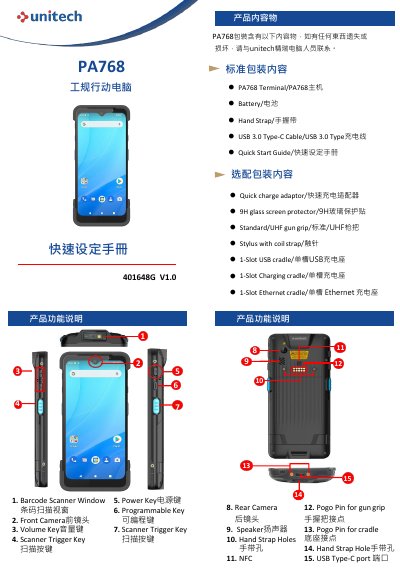
This guide details the contents of the PA768 packaging, including the device, battery, hand strap, and USB cable. It explains how to install SIM and SD cards, replace the battery, and interpret LED indicators for charging and scanning status. Charging instructions specify a 24-hour initial charge and 4-hour routine charge, with LED colors indicating battery status and scanner activity. This manual is written in Chinese.
Charge for approximately 24 hours before first use.
Red: battery charging; Green: battery full and scanning function working; Blue: message notification.
Yes, you can insert one SIM and one SD card simultaneously.