
The Unitech EA630 handheld PDA Quick Start Guide provides setup steps, battery cover handling, LED indicator meanings, and charging instructions.
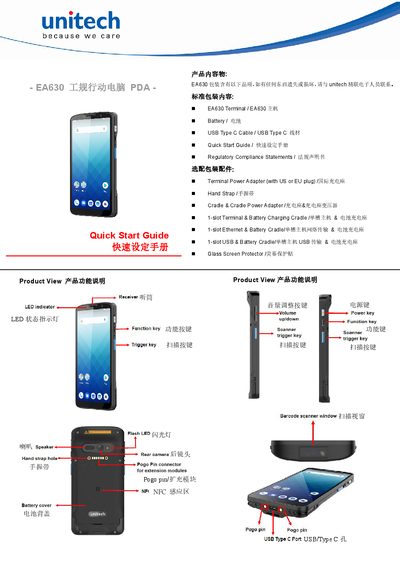
This guide introduces the Unitech EA630 handheld PDA, listing the standard package contents such as the terminal unit, battery, USB‑Type‑C cable, and optional accessories like power adapters and straps. It explains the device’s main features, including LED status indicators, scanning keys, and NFC area.
The manual details how to remove and reinstall the battery cover, describes the meaning of each LED color, and provides charging procedures – a first‑time charge of 24 hours and a normal charge of about 4 hours. Safety warnings for battery handling and connector care are also included. This manual is written in Chinese.
| First‑time charging time | 24 hours |
|---|---|
| Normal charging time | approximately 4 hours |
| LED indicator – Green | Charging complete |
| LED indicator – Blue | Message/scan mode |
Rotate the knob 90° to unlock, lift the cover to 45°, then pull the battery cover out.
Charge for 24 hours on first use, then about 4 hours for normal charging cycles.