
The Tektronix TF‑TekProtect Health Checker User Manual provides safety guidelines, testing procedures, and maintenance steps for verifying TekProtect…
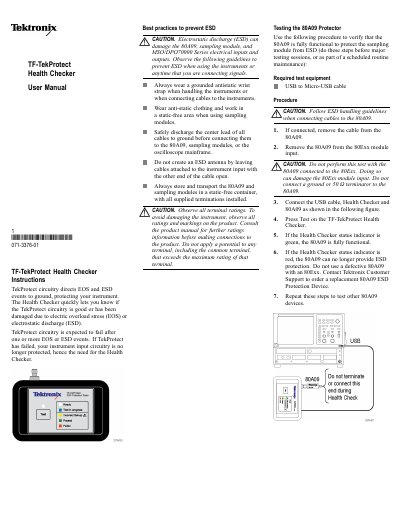
The TF‑TekProtect Health Checker is an accessory that quickly indicates whether TekProtect circuitry in Tektronix instruments is functional or has been damaged by EOS or ESD events. This manual explains safety precautions, required equipment, and step‑by‑step testing procedures for both the 80A09 protector module and MSO/DPO70000 series oscilloscopes.
The document details how to connect the USB‑to‑Micro‑USB cable, perform the test, interpret the green, red, or yellow status indicators, and what actions to take if a fault is detected, including contacting Tektronix support for replacement parts. Standard accessories and environmental compliance information are also listed.
| Indicator color green | Fully functional |
|---|---|
| Indicator color red | Not functional / no ESD protection |
| Required test equipment | USB to Micro‑USB cable |
When the Health Checker status indicator shows green, the 80A09 is fully functional; a red light means it no longer provides ESD protection.
Open the About TekScope screen from the Help menu; the TekProtect status should read "Installed".
You need a USB‑to‑Micro‑USB cable and, for oscilloscope testing, an adapter with a TCA‑292MM cable and an SMA‑to‑SMA cable.