
Quick Setup Guide for the Sony BDV-IZ1000W subwoofer system, covering speaker connection, TV/set‑top box hookup, wireless setup, and software update.
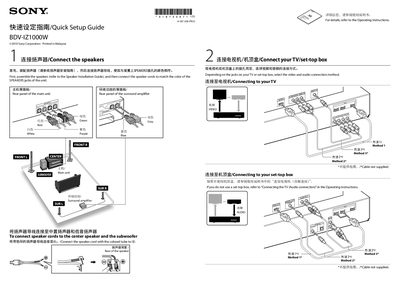
This guide explains how to assemble and connect the speakers to the BDV-IZ1000W, showing the correct colour‑coded speaker jacks on both the main unit and the surround amplifier. It also details the various video/audio connection options for TV or set‑top box, including HDMI, component and coaxial cables.
The document walks you through enabling the wireless S‑AIR transmission, performing the Easy Setup, playing a disc, and updating the system software via an Internet connection. During a software update the front panel displays “UPDATING” and HDMI video may be temporarily unavailable.
| Surround speaker impedance | 3‑16 Ω |
|---|
Assemble the speakers and connect the speaker cords to the matching coloured SPEAKERS jacks on the unit.
Connect the system to the Internet and follow the update steps; the front panel will show “UPDATING” and HDMI video may be blank during the process.