
The Sony HT-CT290/HT-CT291 sound bar user manual explains Bluetooth pairing, TV connections, power setup, and accessory installation.
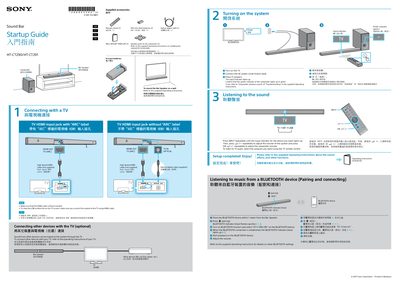
This manual provides step‑by‑step instructions for setting up the Sony HT‑CT290/HT‑CT291 sound bar. It covers Bluetooth pairing, connecting to a TV via HDMI ARC or optical cable, and using the supplied accessories such as the remote control, batteries, and wall‑mount template.
Additional sections describe how to power the system, adjust volume, and troubleshoot common issues. The guide includes multilingual captions and diagrams to help users complete the installation quickly and enjoy the sound bar’s features.
Place the Bluetooth device within 1 meter of the bar speaker, press the pairing button, select “HT‑CT290/291” on the device, and wait for the blue indicator to flash and then stay solid.
Connect a high‑speed HDMI cable to the TV’s HDMI input jack labeled “ARC”, then connect the other end to the sound bar’s HDMI OUT (ARC) port, and ensure the cable is firmly inserted.
Turn on the TV, connect the AC power cord, press the power button on the sound bar, and verify that the green power indicator lights up.