
This document provides quick installation instructions for the NETGEAR WNDR3700 Wireless-N Dual-Band Gigabit Router, covering basic internet setup and…
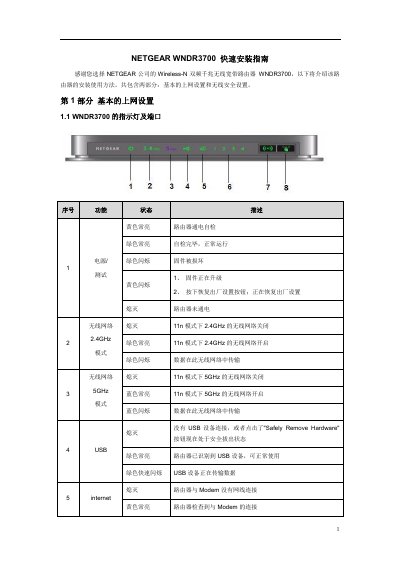
This guide covers the initial setup of the NETGEAR WNDR3700 router. It details how to connect the hardware components, including power, WAN/Modem connections, and LAN ports for local devices or USB storage.
The document explains how to configure computer network settings (specifically for Windows XP, Vista, and 7) to obtain an IP address via DHCP before accessing the router's management interface. It provides default login credentials and troubleshooting steps if the login page does not appear. This manual is written in Chinese.
The default management IP address is 192.168.1.1.
The default username is admin and the password is password, both in lowercase.
The guide covers basic internet setup and wireless security setup.