
Step‑by‑step instructions for setting up the Netgear R2000 N300 wireless router, including modem connection, login, and factory reset.
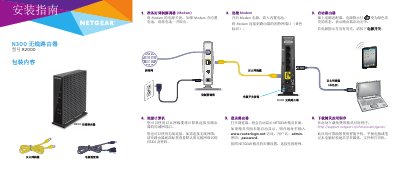
This guide walks you through preparing the modem, connecting it to the router, and linking a computer via Ethernet or Wi‑Fi. It also shows how to start the router, log into the web interface, and download the Netgear Genie app for easy configuration.
Additional sections cover joining the wireless network manually or via WPS, changing router settings, performing a factory reset, and obtaining technical support. This manual is written in Chinese.
| Default SSID | Printed on product label |
|---|---|
| Default Wi‑Fi password | Printed on product label |
Press the reset button inside the hole on the router’s bottom for at least 7 seconds using a pin or similar object.
The default Wi‑Fi password is printed on the product label.