
This manual provides installation, setup, maintenance, and usage instructions for the HP TouchSmart PC.
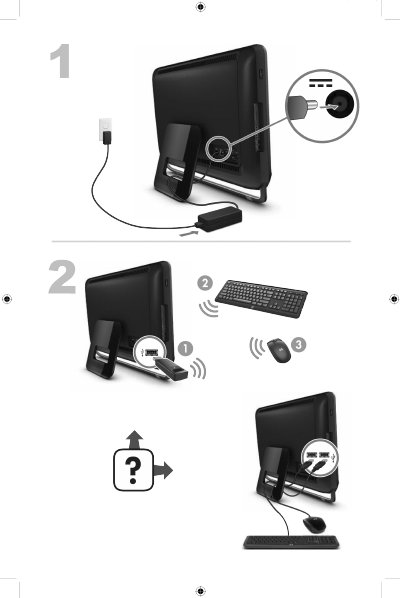
The HP TouchSmart PC User Manual guides users through getting information, installing the computer, and configuring basic functions. It includes steps for connecting to the Internet, using Windows 7 tools, and accessing HP support resources.
Additional sections cover optional features such as Beats Audio and HDMI port controls, as well as detailed cleaning and maintenance procedures to keep the all‑in‑one PC operating safely and reliably. This manual is written in Chinese.
| Audio Feature | Beats Audio™ support (partial models) |
|---|---|
| HDMI Port | HDMI port on right side with volume control button |
Press the Beats toggle button on the keyboard (or Fn+B if the button is not present) to turn Beats Audio on or off; an on‑screen icon shows the status.