
Software update instructions and change notes for the FUTABA T32MZ transmitter.
This document is a software update notice for the FUTABA T32MZ transmitter. It describes the update procedure, version verification steps, and changes introduced across several editor and encoder versions.
It covers features and corrections such as governor R.P.M. range expansion, Futaba and Hobbywing ESC telemetry support, GYA553 setting parameters, SCORPION ESC telemetry support, power-off switch press time, screen-off mode, Chinese display support, GPS display correction, and KS-01 kill switch support.
| Governor R.P.M. range | 700 to 3500 rpm |
|---|---|
| Screen-off battery consumption | about 4% per hour |
| Power-off switch press time | 1 second or 4 seconds |
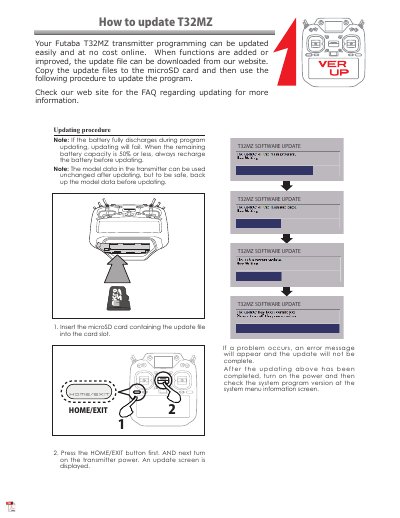
When the remaining battery capacity is 50% or less, recharge the battery before updating.
The model data can be used unchanged after updating, but it should be backed up before updating.
Select the System Menu, touch the Information button, and confirm the displayed Editor and Encoder version numbers.
While in screen-off mode, it consumes about 4% of the battery per hour.