
Operation guide for Delta's VFD-PU05 digital keypad, covering button functions, display messages, and parameter duplication.
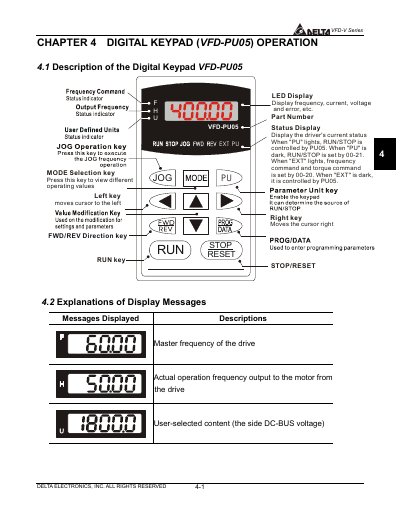
This manual explains how to operate the VFD-PU05 digital keypad for Delta's VFD-V series inverters. It details button functions like RUN, STOP, and PROG/DATA, as well as display messages for status and parameters. The guide also covers parameter duplication and saving functions using the keypad.
Key operations include using the PROG/DATA key to copy or save parameters, navigating with arrow keys, and interpreting display messages such as 'PU' or 'EXT' status indicators. This manual is written in Chinese.
Press PROG/DATA and hold for 2~3 seconds until it blinks, then press Up or Down to select 'READ' to copy the parameter.
Press PROG/DATA and hold for 2~3 seconds until it blinks, then press Up or Down to select 'SAVE' to write the parameter into the drive.
When 'PU' lights, RUN/STOP is controlled by the PU05. When 'PU' is dark, RUN/STOP is set by 00-21.