
This document describes the features and characteristics of the My Passport® portable hard drive series, including different models' capacity, interfaces, backup software, colors, features, and warranty period.
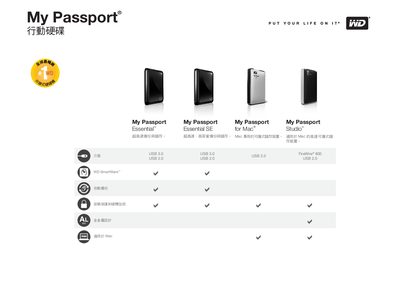
The My Passport series includes Essential, Essential SE, for Mac, and Studio models, offering capacities from 500 GB to 1 TB. The devices connect via USB 3.0, USB 2.0, or FireWire 800, allowing fast data transfer to PCs and Macs.
Included software such as WD SmartWare, WD Security, and WD Drive Utilities helps you back up, encrypt, and manage your files. The manual also contains warranty and support details from Western Digital.
| Interface | USB 3.0, USB 2.0, FireWire 800 |
|---|
It supports USB 3.0, USB 2.0, and FireWire 800.