
The document describes the repair information for Samsung plasma TV, including troubleshooting and repair steps.
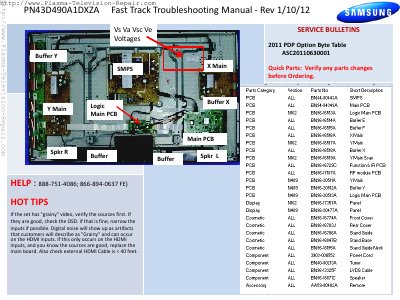
This Fast Track Troubleshooting Manual for the Samsung PN43D490A1DXZA plasma TV provides service bulletins, an option byte table, quick parts information, and hot tips for issues such as grainy video. It lists the power-on sequence and connector pin signals between the SMPS, main board, and logic board.
The manual includes power supply troubleshooting notes, over-current protection behavior, and checks for the Vs, Va, Vsc, and Ve voltages. It also covers video problem troubleshooting, entering service mode, on-screen failure examples, alignments, and a diffusion test and adjustment procedure.
| Model | PN43D490A1DXZA |
|---|---|
| Standby voltage | 5 V |
| PS_ON signal | approximately 3.3 V to 0 V |
| VS_ON signal | approximately 0 V to 3.3 V |
| Low-voltage rails | 5 V and 15 V |
Verify the sources first, then check the OSD and narrow the inputs if possible. If the issue occurs only on HDMI inputs and the sources are good, replace the main board.
Check Vs, Va, Vsc, and Ve first during troubleshooting.
Power off, then press Mute, 182, Power.
Wait until power has been off long enough for Vs to drop below 10 V before reconnecting.