
Dell OptiPlex 7050 Micro Desktop Quick Start Guide
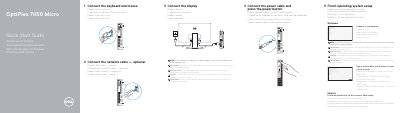
This guide helps you set up your Dell OptiPlex 7050 Micro desktop. Connect peripherals, power, and display, then complete OS setup. It includes instructions for connecting to a network and signing in to your Microsoft or local account.
The guide also lists hardware ports and features, such as USB 3.0, DisplayPort, HDMI, and Kensington security slot, to help you identify and use them correctly.
Connect the keyboard and mouse, optionally connect the network cable, connect the display, then connect the power cable and press the power button, and finish the operating system setup.
Connect the display to the discrete graphics card instead of the built-in video output.
It has a power button and power light, hard drive activity light, headset port, line-out port, USB 3.0 Type-C port, USB 3.0 port with PowerShare, optional antenna SMA connector, optional VGA, Serial, PS/2 or DisplayPort, Kensington security cable slot, padlock ring, cable holder, DisplayPort, HDMI port, power connector port, network port, and USB 3.0 ports including one that supports Smart Power On.
Enter the password for the wireless network access when prompted.