
Dell Inspiron 24-5459 Quick Start Guide
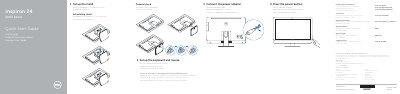
This Quick Start Guide from Dell covers the initial setup of the Inspiron 24 5000 Series all-in-one computer, model Inspiron 24-5459 (regulatory model W12C). It explains connecting the power adapter, setting up the stand (pedestal or articulating), the keyboard and mouse, and pressing the power button.
The guide continues with finishing Windows setup, setting a Windows password, connecting to a network, and locating further documentation via Dell Help Documentation. It also lists the computer's 20 numbered features, including cameras, microphones, USB 3.0 and USB 2.0 ports, HDMI-in and HDMI-out ports, a media-card reader and an optional optical drive. Support, regulatory compliance and contact information are provided at Dell.com addresses.
| Input voltage | 100 V AC–240 V AC |
|---|---|
| Input frequency | 50 Hz–60 Hz |
| Input current | 2.50 A |
| Output voltage | 19.50 V DC |
| Output current | 4.62 A / 6.70 A |
| USB 3.0 ports | 2 |
| USB 2.0 ports | 4 |
| Optical drive | Optional |
Enter the password for the wireless network access when prompted.
Click Start → All Programs → Dell Help Documentation.