
The Dell P28F monitor complies with the NOM standard, with an input voltage of 100-240V AC, an input current of 1.50A/1.60A/1.70A/2.50A, an input frequency of 50Hz-60Hz, an output current of 3.34A/4.62A, and an output rated voltage of 19.50VDC.
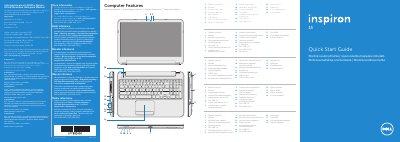
This is a multilingual quick start guide for the Dell Inspiron 3521 computer (regulatory model P28F, type P28F001). It walks through the first setup steps: connecting the power adapter, connecting an optional network cable, pressing the power button, completing the Windows setup, checking the wireless status, and locating the service tag or regulatory label.
The guide also lists the computer's features with a numbered illustration — digital microphone, camera and camera-status light, security-cable slot, optical drive, USB 2.0 and USB 3.0 ports, 8-in-1 media-card reader, status lights, touchpad, headphone/microphone combo port, network port, HDMI port, power-adapter port and power button — and describes the function keys. A page in Spanish gives the NOM (Norma Oficial Mexicana) importer and input/output electrical ratings.
| Regulatory model | P28F |
|---|---|
| Regulatory type | P28F001 |
| Computer model | Inspiron 3521 |
| Input voltage | 100 – 240 V AC |
| Input current (maximum) | 1.50 A / 1.60 A / 1.70 A / 2.50 A |
| Input frequency | 50 Hz – 60 Hz |
| Output current | 3.34 A / 4.62 A |
| Nominal output voltage | 19.50 V DC |
| USB ports | USB 2.0 ports and two USB 3.0 ports |
The regulatory model P28F (type P28F001) corresponds to the Inspiron 3521 computer.
Connect the power adapter, then press the power button and complete the Windows setup.
The guide points you to the service tag/regulatory label on the computer so you can record the number.
The guide shows how to check the wireless status, with the wireless-status light indicating Wireless ON or Wireless OFF.