
The Dell Vostro 3267/3268 Quick Start Guide introduces the features and characteristics of the product.
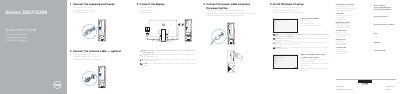
The Dell Vostro 3267/3268 Quick Start Guide shows how to connect the keyboard and mouse, connect an optional network cable, connect the display, and connect the power cable before pressing the power button. It then explains how to finish Windows 10 setup, connect to a network, and sign in to a Microsoft account or create a local account.
The guide also covers creating recovery media for Windows, locating Dell apps such as Dell Product Registration and Dell SupportAssist, and identifying the computer's features and ports. Product support, regulatory, and safety links are included.
| Computer model | Vostro 3267/3268 |
|---|---|
| Regulatory model | D13S |
| Regulatory type | D13S002 |
| USB ports | USB 2.0 and USB 3.0 |
| Display ports | VGA and HDMI |
Connect the display to the discrete graphics card.
Enter the password for the wireless network access when prompted.
In Windows search, type Recovery, click Create a recovery media, and follow the on-screen instructions.
Visit Dell.com/support and Dell.com/support/manuals.