
The Dell 5230/5350 Quick Reference Guide provides instructions on how to load paper and special media.
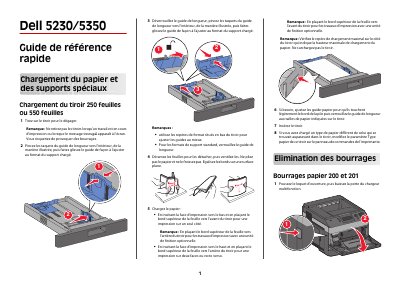
This Dell 5230/5350 quick reference guide explains how to load paper into the 250-sheet or 550-sheet tray, including adjusting the length guides, fanning and aligning the sheets, and selecting the paper type on the printer control panel.
It also gives instructions for clearing paper jams 200, 201, 202–203, and 241–245, including removing the toner cartridge, taking out jammed paper, and using the rear doors. This manual is written in French.
| Input tray capacity | 250 or 550 sheets |
|---|
Load the paper with the print side facing down and the top edge of the sheet toward the front of the tray.
Push the release latch to open the multipurpose feeder door and front cover, remove the toner cartridge, take out the jammed paper, then reinstall the cartridge and close the covers.
Remove the tray from the printer, remove the jammed paper, reinsert the tray, and press the button.