
Dell™ Color Laser Printer 5110cn User's Guide Notes, Notices, and Warnings
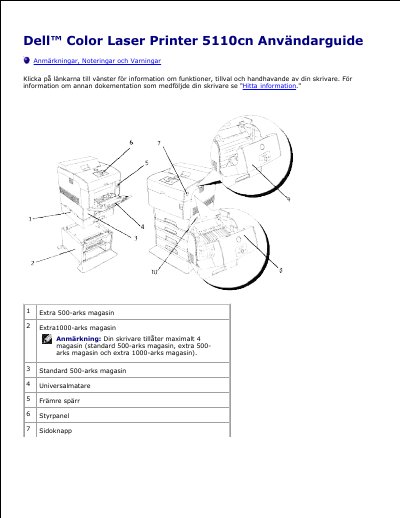
This Swedish user guide describes the Dell 5110cn color laser printer and its paper trays, front cover, control panel, and power button. It explains how to find information about drivers, documentation, warranty, and service, including the Express Service Code and Service Tag number located inside the front cover.
The guide covers the Dell Printer Configuration Web Tool, including printer status, printer jobs, printer settings, printer server settings, copying printer settings, print volume, Dell ColorTrack, printer information, tray settings, e-mail alerts, password protection, and online help. It also describes browser language and proxy settings for Netscape Communicator 7.1 and Internet Explorer 6.0/7.0. This manual is written in Swedish.
| Maximum number of paper trays | 4 (standard 500-sheet tray, optional 500-sheet tray, optional 1000-sheet tray) |
|---|---|
| Standard paper tray capacity | 500 sheets |
| Optional 500-sheet paper tray | Extra 500-sheet tray |
| Optional 1000-sheet paper tray | Extra 1000-sheet tray |
They are located inside the front cover of the printer.
Push the front latch upward to open it.
Enter the network printer's IP address in a web browser.
It restricts which users can use color mode and the maximum number of sheets they can print.