
The Dell Latitude 15 3000 Series Notebook Quick Start Guide provides information on how to connect the power adapter, finish operating system setup, connect to a network, sign in to a Microsoft account or create a local account, locate Dell apps in Windows 8.1, get product support and manuals, and contact Dell.
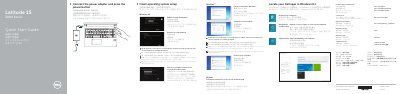
This two-page quick start guide from Dell walks through the first-time setup of the Latitude 15 3000 Series notebook, computer model Latitude 15-3560. Steps include connecting the power adapter and pressing the power button, finishing operating system setup, enabling security and updates, connecting to a network, and signing in to a Microsoft account or creating a local account. Additional steps cover setting a Windows password and locating Dell apps such as SupportAssist and Dell Backup and Recovery in Windows 8.1. The guide refers to Windows 8.1, Windows 7 and Ubuntu and points to dell.com/support/manuals for the Owner's Manual.
The second page labels the notebook's features, from camera, microphone and power button to the security-cable slot, VGA, USB 2.0 and USB 3.0 connectors, HDMI and network connectors, battery and service-tag label. The document also lists regulatory and safety links, contact details for Dell, and a regulatory notice block giving the regulatory model P50F, regulatory type P50F001 and rated voltage, frequency and input current. The text is printed in English, Chinese, Japanese and Korean.
| Computer model | Latitude 15-3560 |
|---|---|
| Rated voltage | 100 - 240 V |
| Rated frequency | 50 / 60 Hz |
| Rated input current | 1.7 A (65 W) / 2.5 A (90 W) |
Connect the power adapter and press the power button.
When prompted, enter the password for the wireless network access.
Dell points to the Owner's Manual at dell.com/support/manuals.
The guide lists dell.com/contactdell as the contact page, with regulatory information at dell.com/regulatory_compliance.