
Dell Precision Tower 7910 Quick Start Guide

The Dell Precision Tower 7910 Quick Start Guide provides information on how to set up and use the Dell Precision Tower 7910 computer.
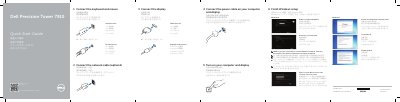

Dell Precision Tower 7910 Quick Start Guide - cover page
Brand
DELL
Category
Desktops
Document type
Quick Start Guide
Language
English
Pages
2
File format
PDF
File size
700 KB
Published
25 November, 2023
Updated
25 November, 2023
MD5 checksum
78006C5B87712E568576EF6CCFEA7BAC

About this manual

The Dell Precision Tower 7910 Quick Start Guide provides step-by-step instructions for setting up the workstation, including connecting peripherals, network cables, and displays, as well as completing the Windows setup process.

The document also includes a detailed map of the computer's external features, identifying various ports, connectors, and release latches on the chassis.

What's inside

  • Connect the keyboard and mouse
  • Connect the network cable
  • Connect the display
  • Connect the power cable
  • Turn on your computer and display
  • Finish Windows setup
  • Features

Specifications

Regulatory typeD02X003

Frequently asked questions

How do I connect a display to the Dell Precision Tower 7910?

You can connect the display using either a DVI Connector or a DisplayPort Connector.

What should I do if I am connecting to a secured wireless network during setup?

Enter the password for the wireless network access when prompted.

Download PDF (700 KB)

More DELL Manuals


View all DELL manuals →