
The Dell Latitude 13 7000 Series Quick Start Guide provides instructions on how to connect the power adapter, turn on the computer, complete Windows setup, insert an optional SD memory card (sold separately), and insert a micro-SIM card (on LTE/HSPA+ models only).
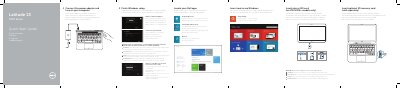
This guide shows basic setup steps for a Dell Latitude 13 7000 Series computer, including connecting power, completing Windows setup, inserting optional SD and micro-SIM cards, and connecting to a network.
It also identifies the computer's external features and ports, lists support and regulatory information, and notes optional items such as an NFC reader, fingerprint reader, security-card reader, and rear camera.
| NFC reader | Optional |
|---|---|
| Fingerprint reader | Optional |
| Security-card reader | Optional |
| Rear camera | Optional |
| Micro-SIM reader | LTE/HSPA+ models only |
| SD memory card reader | Full-sized |
Undock the computer to access the SIM card slot.
Enter the password for the wireless network access when prompted.
Latitude 7350.