
OptiPlex 5040 Mini Tower Quick Start Guide
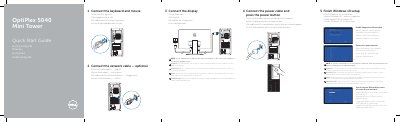
This is the Quick Start Guide for the Dell OptiPlex 5040 Mini Tower computer (regulatory model D18M, regulatory type D18M001). It walks through the basic connections in order: keyboard and mouse, optional network cable, power cable and power button, and the display — with a note that a computer ordered with a discrete graphics card should have the display connected to that card.
The guide then covers finishing Windows 10 setup, enabling Support and Protection, connecting to a network (including entering the password for a secured wireless network) and signing in to a Microsoft account or creating a local account. A features section lists the front and back connectors and controls with numbered callouts, and the last part points to Dell apps, Dell support and regulatory compliance pages.
| Computer model | OptiPlex 5040 MT |
|---|---|
| Regulatory model | D18M |
| Regulatory type | D18M001 |
| USB | USB 3.0 connectors, USB 2.0 connector with PowerShare, USB 2.0 connectors supporting Smart Power On |
| Display connectors | HDMI connector, DisplayPort connectors, VGA connector (optional) |
| Other connectors | Line-out connector, headphone connector, serial connector, PS2/keyboard connector, PS2/mouse connector, network connector |
| Expansion | Optical-drive bay, expansion-card slots, memory card reader (optional) |
| Diagnostics and security | Power-supply diagnostic button and light, cable-cover lock slot, security-cable slot, padlock ring |
Connect the display to the discrete graphics card instead of the onboard connector.
Enter the password for the wireless network access when prompted.
Finish Windows 10 setup, enable Support and Protection, connect to your network, then sign in to your Microsoft account or create a local account.
Dell lists them at Dell.com/support and Dell.com/support/manuals.