
OptiPlex 3050 Micro Desktop Quick Start Guide
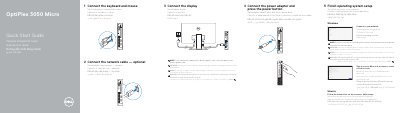
This guide covers initial setup of the Dell OptiPlex 3050 Micro desktop. It describes connecting the keyboard and mouse, optional network cable, display, and power adapter, then pressing the power button and completing operating system setup.
The guide also shows where to find Dell apps such as SupportAssist, lists the front and back panel features and ports, and provides product support, manuals, regulatory, and safety information.
| Regulatory model | D10U |
|---|---|
| Regulatory type | D10U002 |
| Computer model | OptiPlex 3050 Micro |
| USB 3.0 ports | Present |
| USB 2.0 ports | Present |
| DisplayPort | Present |
| HDMI port | Present |
| Network port | Present |
| Kensington security cable slot | Present |
| Printed in | China |
Connect the display, and if the computer was ordered with a discrete graphics card, connect the display to the discrete graphics card.
Press the power button, then finish the operating system setup by following the instructions on the screen.
Enter the password for wireless network access when prompted.
The guide points to Dell apps such as SupportAssist and lists Dell.com/support, Dell.com/support/manuals, and Dell.com/contact for support.