
Dell Latitude 12 7000 Series 2-in-1 Quick Start Guide
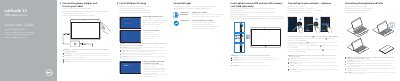
This document serves as a quick start guide for the Dell Latitude 12 7275 2-in-1 tablet. It provides multilingual instructions on connecting the power adapter, inserting SIM and microSD cards, and completing the initial Windows 10 setup process. The guide also details how to connect and disconnect the optional keyboard and Folio cover.
| Operating System | Windows 10 |
|---|---|
| Keyboard Backlight Duration | 2 seconds |
| SIM Card Type | micro-SIM |
It is recommended to insert the micro-SIM card and the microSD card before powering on the tablet.
The keyboard backlight turns on for 2 seconds when the tablet-docking pins and keyboard-docking pins are aligned correctly.
You can find support and manuals at Dell.com/support or Dell.com/support/manuals.