
Dell Bluetooth Keyboard Folio WK415 Quick Start Guide.
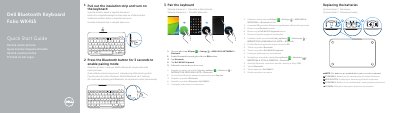
This quick start guide covers the Dell Bluetooth Keyboard Folio WK415, a keyboard case for tablets. It shows how to pull out the insulation strip and turn the keyboard on, then how to pair it: press the Bluetooth button for three seconds to enter pairing mode and select "Dell WK415 Keyboard" in the tablet's Bluetooth settings. Steps for the tablet menu path (All Apps → Settings → WIRELESS & NETWORKS → Bluetooth) are printed in English alongside Czech, Hungarian, Slovak and Slovenian text.
The guide also describes replacing the batteries, noting that batteries are already installed when the keyboard is received, and lists the shortcut keys (Home, Back, search, brightness, volume, mute, play/pause and track/chapter selection). A numbered features list identifies the Home key, shortcut keys, battery tray, power-status light, Bluetooth-status light, Bluetooth button, power switch, tablet case, stylus holder and tablet stand/flip cover. Support, contact and regulatory web addresses are given at the end.
| Regulatory model | K07M (K07M001) |
|---|---|
| Battery installation | Batteries are pre-installed at delivery |
Press the Bluetooth button for 3 seconds to enable pairing mode, then select Dell WK415 Keyboard on your tablet.
Tap All Apps → Settings → WIRELESS & NETWORKS → Bluetooth, move the slider to ON, then tap Bluetooth.
No, the batteries are installed when you receive the keyboard.
Manuals are at dell.com/support/manuals and Dell can be contacted via dell.com/contactdell.