
OptiPlex 7440 All-in-One Quick Start Guide
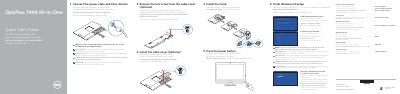
The Dell OptiPlex 7440 All-in-One quick start guide presents numbered setup steps. It covers connecting the power cable and other devices, removing the torx screw from the optional cable cover, installing the cable cover, installing the stand, pressing the power button, and finishing Windows 10 setup.
The guide also lists the computer's features and ports, such as the camera privacy latch, optical drive, OSD buttons, DisplayPort and HDMI connectors, USB 3.0 and USB 2.0 connectors, network connector, and memory card reader. It includes steps for connecting to a network, signing in to a Microsoft account or creating a local account, locating Dell apps, and finding product support and manuals.
| Computer model | OptiPlex 7440 AIO |
|---|---|
| Camera privacy | Camera privacy latch |
| Optical drive | Optical drive |
| Display output | HDMI-out connector |
| Display input | HDMI-in connector |
| USB 3.0 port | USB 3.0 connector |
| USB 2.0 ports | USB 2.0 connectors |
| Memory card reader | Memory card reader |
Complete the Finish Windows 10 setup step and follow the instructions on the screen.
See the Owner’s Manual at dell.com/support.
See the documentation that shipped with the wireless keyboard or mouse.
Enter the password for the wireless network access when prompted.