
Dell™ OptiPlex™ All-in-One Stand User Guide.
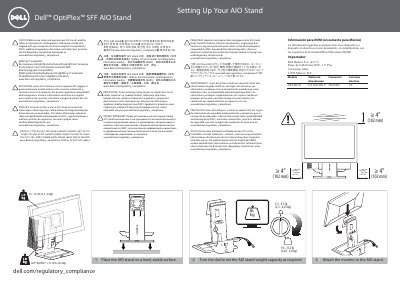
This setup guide for the Dell OptiPlex SFF AIO Stand (model 1KAIO-01) shows how to place the stand on a level, stable surface, set the weight capacity with the dial, and attach the monitor. It then covers routing monitor cables through the front slot and cable channel, sliding the computer chassis into the stand, and locking it with the switch.
The document also notes that the cable cover can be attached to the computer chassis, the network and power cable can be connected, and security accessories can be installed. It directs users to read the Safety, Environmental, and Regulatory Information Guide before setup and provides regulatory compliance contact information.
| Weight capacity setting, lower range | 5.5 - 9.3 lb (2.5 - 4.25 kg) |
|---|---|
| Weight capacity setting, upper range | 9.4 - 13.2 lb (4.26 - 6.0 kg) |
| Dell OptiPlex weight limit | ≤ 13.75 lbs (6.24 kg) |
| Minimum clearance | ≥ 4 in (102 mm) |
| Power input | 100-240 V AC, 50/60 Hz, 7 A |
Place the AIO stand on a level, stable surface.
Turn the dial to set the AIO stand weight capacity as required.
Slide the switch to lock the computer to the AIO stand.
Read the Safety, Environmental, and Regulatory Information Guide that shipped with your computer.