
This document describes how to set up a Dell computer.
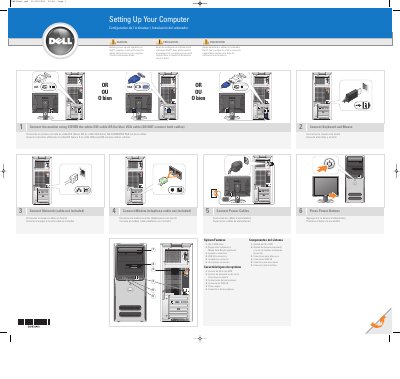
This two-page Dell setup guide walks through the first steps of putting a computer together: connecting the monitor with either the white DVI cable or the blue VGA cable (not both), connecting the keyboard and mouse, connecting the network and modem, and connecting the power cables before pressing the power buttons. The last steps cover the optional remote control sensor and batteries and launching the optional Media Center operating system.
A system features section identifies the CD or DVD drive, the optional floppy drive or Media Card Reader, speaker connectors, USB 2.0 connectors, the headphone connector and the microphone connector. A wireless network diagram shows the parts of an optional wireless setup, and the guide explains where to find answers in the Owner's Manual and in Help and Support. The text is printed in English, French and Spanish.
| Optical drive | CD or DVD drive |
|---|---|
| Media bays | Floppy drive (optional) or Media Card Reader (optional) |
| USB ports | USB 2.0 connectors |
| Audio connectors | Speaker connectors, headphone connector, microphone connector |
| Monitor connection | White DVI cable or blue VGA cable (do not connect both) |
Use either the white DVI cable or the blue VGA cable, and do not connect both cables at the same time.
Read and follow the safety instructions in the computer Product Information Guide.
No. The guide notes that the network cable is not included, and the telephone cable for the modem is not included either.
You can view it online by clicking the Owner's Manual icon on the desktop.