
Dell Dimension Computer Setup Instructions

Setup instructions for Dell computers

Dell Dimension Computer Setup Instructions - cover page
Brand
DELL
Category
Desktops
Document type
User Manual
Language
English
Pages
2
File format
PDF
File size
1.3 MB
Published
20 November, 2023
Updated
20 November, 2023
MD5 checksum
B2B24EF24925B26384C2FCF9D5201153

About this manual

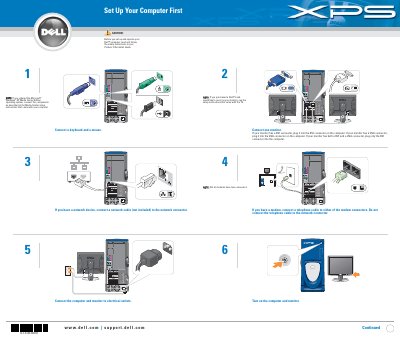
This document provides initial setup instructions for a Dell Dimension computer. It details how to connect various peripherals, including monitors with DVI or VGA connectors, keyboards, mice, and electrical power. It also covers connecting network cables and telephone cables for modems.

What's inside

  • Connect one monitor
  • Connect a keyboard and a mouse
  • Connect the computer and monitor to electrical outlets
  • Connect a network cable
  • Connect a telephone cable
  • Turn on the computer and monitor
  • Set Up Other Devices
Download PDF (1.3 MB)

More DELL Manuals


View all DELL manuals →