
Dell Dimension Computer Setup Guide

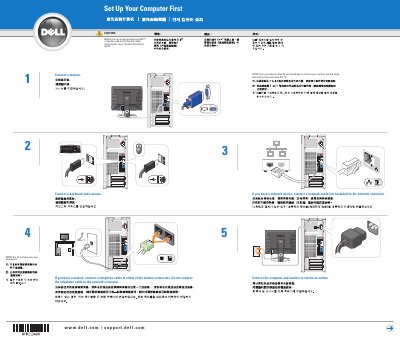
This document describes the steps to set up a Dell computer, including connecting a monitor, keyboard, and mouse, and connecting the computer and monitor to power outlets.

Dell Dimension Computer Setup Guide - cover page
Brand
DELL
Category
Desktops
Document type
User Manual
Language
English
Pages
2
File format
PDF
File size
3.6 MB
Published
20 November, 2023
Updated
20 November, 2023
MD5 checksum
2EF511BA79D9047910EFD570B9BF5CE9

About this manual

This document provides initial setup instructions for Dell Dimension computers. It details how to connect essential peripherals including a monitor, keyboard, mouse, and electrical power sources. Users are advised to consult the Product Information Guide for safety instructions before beginning the setup process.

What's inside

  • Connect a monitor
  • Connect a keyboard and a mouse
  • Connect electrical outlets
  • Connect a telephone cable
  • Connect a network cable
  • Turn on the computer and monitor
  • Set up other devices
Download PDF (3.6 MB)

More DELL Manuals


View all DELL manuals →