
Dell Dimension 1100/B110 Desktop Owner's Manual
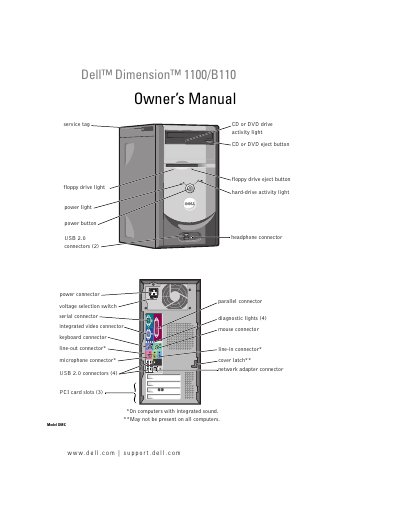
This document serves as the Owner's Manual for the Dell Dimension 1100/B110 desktop computer. It covers the initial setup of the system, including connecting printers, setting up home and office networks, and configuring internet connections. The guide also details how to play and copy CDs and DVDs, adjust system volume and picture settings, and utilize the integrated video and audio features.
| Processor type | Intel Pentium 4 with HT Technology and Intel Celeron |
|---|---|
| L1 cache | 8 KB |
| L2 cache | 128-KB or 512-KB |
| Memory Type | 333- and 400-MHz DDR SDRAM |
| Memory connectors | two |
| Minimum memory | 128 MB |
| Maximum memory | 2 GB |
| BIOS address | F0000h |
The diagnostic lights are used to help identify hardware issues when the computer encounters problems.
You can use the Service Tag located on your computer to identify it when using support.dell.com or contacting technical support.
Yes, you can connect USB devices while the computer is turned on.