
The Dell™ Dimension™ 9200 Owner's Manual provides information on how to use the Dell™ Dimension™ 9200 computer.
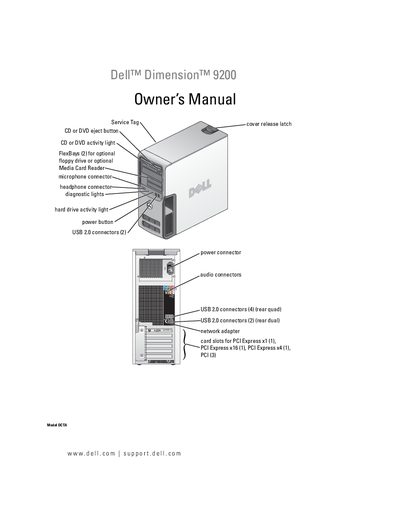
This Owner's Manual covers the setup and use of the Dell Dimension 9200 computer. It includes instructions for connecting monitors, printers, and networks, as well as playing and copying media. The guide also explains how to optimize performance using features like Hyper-Threading and Intel Viiv Technology.
| Processor type | Intel Pentium 4, Pentium D, Core 2 Duo |
|---|---|
| Memory type | dual-channel 533-, 667-, and 800-MHz DDR2 |
| Minimum memory | 512 MB |
| Maximum memory | 4 GB |
| Chipset | Intel P965 Express Chipset |
| NIC | Integrated Intel 82566DC Gigabit Network Connection |
| Video Type | PCI Express |
The minimum memory required is 512 MB.
You can clear forgotten passwords by following the instructions in the System Setup section of this manual.