
The Dell™ Dimension™ 5150/E510 User's Manual provides information on how to use the Dell™ Dimension™ 5150/E510 computer.
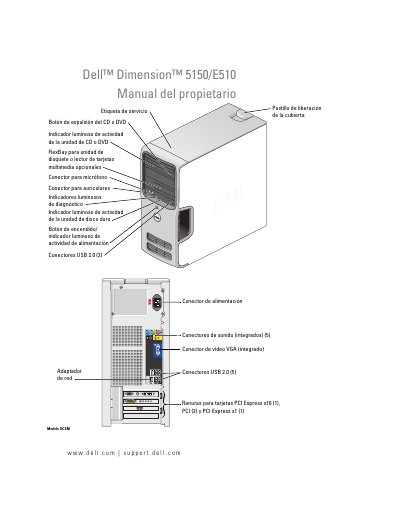
This manual provides instructions for the Dell Dimension 5150/E510 desktop computer, including setup, usage, and troubleshooting. It details how to connect peripherals such as printers, monitors, and network adapters, as well as how to manage power settings and use diagnostic tools. This manual is written in Spanish.
| USB 2.0 ports (front) | 2 |
|---|---|
| USB 2.0 ports (rear) | 5 |
| PCI Express x16 slots | 1 |
| PCI Express x1 slots | 1 |
These labels are adhered to the computer and should be used to identify the computer when visiting support.dell.com or contacting technical support.
DSS provides critical updates for the operating system and support for Dell floppy disk drives, Intel Pentium M processors, optical drives, and USB devices.