
Dell Wyse 5000 Series Thin Client Wyse 5060 Quick Start Guide
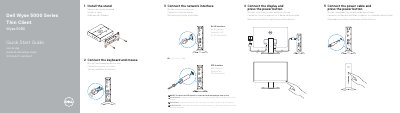
This quick start guide provides step-by-step instructions for setting up the Dell Wyse 5060 thin client, including installing the stand, connecting keyboard, mouse, power, display, and network interfaces. It also includes a detailed features list identifying all ports and indicators on the device.
The guide is presented in English, Dutch, French, and German. It notes optional components such as wireless antenna ports, a 10/100/1000 Base-T network port, and an SFP interface. Regulatory information and support links are provided at the end.
| Power button / Power light | Present |
|---|---|
| Activity light | Present |
| Headset port | Present |
| Product information tag | Present |
| Power port | +19V |
| Security-cable slot | Present |
| DisplayPort | 2 |
| USB 3.1 Gen 1 ports | 2 |
| Network port | 10/100/1000 Base-T (optional) |
| SFP interface | Optional |
The device includes two DisplayPorts, two USB 2.0 ports on the front, two USB 2.0 ports on the rear, two USB 3.1 Gen 1 ports, a headset port, optional wireless antenna ports, an optional 10/100/1000 Base-T network port, and an optional SFP interface.
Rotate the latch and unplug the SFP interface from its slot.