
LIFT Telecine Suite Guide (November 2023 - Noah Henderson) The Telecine suit consists of two projectors and a BlackMagic Ursa 4K camera. Using a prism and a diopter mounted on the table, a projector will project the film into a lens mounted on the Ursa digital camera so that a digital capture can be created of the projected image! BENCH The Telecine suite has a small setup bench for viewing and winding through your film. There are take-up reels for the projectors, film rewinds, and small viewers. POSITIONING, THREADING & PROJECTING When projecting onto the Ursa, the mirror between the projector needs to be positioned properly so that it will reflect the image through the diopter and into the camera lens. There are pencil marks on the base and lining the rotating mirror up with these will get you to a good starting position (the pencil marks can be referred to for either 16 or S8/8, by just rotating the mirror around to face the proper projector). Rotating the mirror further will allow for some fine tuning of this positioning, but it is a very small area before it begins to be cut off. The projectors are on platforms that shouldn’t be adjusted and have marks for where the projector sits. Using a sheet of paper, you can easily see the projected area on the diopter. It should sit in the middle of the diopter: Super 8 The Elmo ST-180 M-0 2-Track is a Super 8 sound projector (capable of magnetic or optical soundtrack playback) that features autoloading and speed control. Press dow
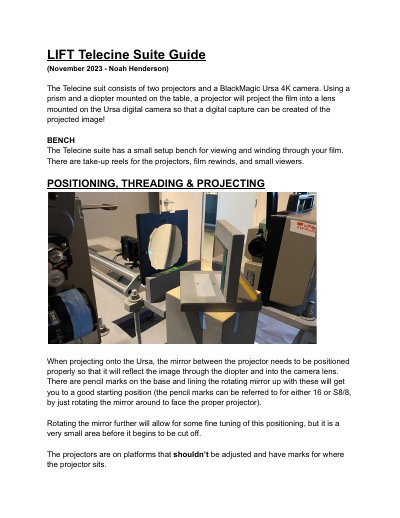
This document describes a telecine setup consisting of two Elmo projectors and a Blackmagic Design Ursa 4K camera. The system uses a prism and diopter to project film images onto the camera sensor for digital capture. It covers the positioning of the mirror, threading procedures for different film formats, and camera settings.
| Camera Model | Ursa 4K |
|---|---|
| Supported Film Formats | Super 8, Regular 8, 16mm |
| Super 8 Playback Speed | 18fps or 24fps |
| Regular 8 Playback Speed | 16fps |
| 16mm Threading Type | Manual |
| Recommended Shutter Angle (Super 8 @ 18fps) | 150° |
| Recommended Shutter Angle (Super 8 @ 24fps) | 120° |
| Recommended Shutter Angle (Regular 8) | 150° |
| Recommended ISO | 200 |
| Storage Capacity | 250gb SSD |
Use a 150° shutter angle to reduce flicker.
Use a 120° shutter angle to reduce flicker.
The camera should remain at 200 ISO to introduce the least amount of digital noise.
ProRes 422 is recommended for good quality and manageable file sizes.