
This product is a gamepad that supports体感操作和参数调节, and can be connected to Switch via Bluetooth.
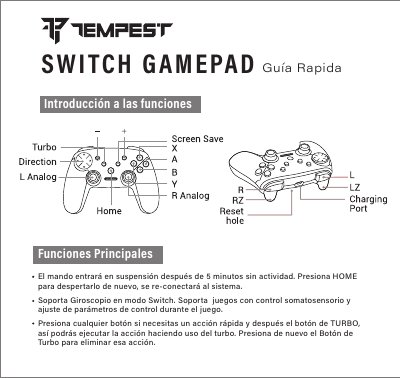
This quick start guide explains how to pair and reconnect a wireless gamepad with a Nintendo Switch and lists Bluetooth pairing modes for Android, PC, Mac, and PS3. It also describes sleep behavior, gyroscope support in Switch mode, somatosensory game support, and turbo button use.
The guide includes first-time pairing steps, reconnection steps, mode button combinations, LED indicators, and notes about vibration and gyroscope availability on Android and USB connections. This manual is written in Spanish.
| Sleep timeout | 5 minutes of inactivity |
|---|---|
| Gyroscope | Supported in Switch mode |
| Android vibration | Not available |
| USB vibration | Works over USB |
Turn on the console, open Controllers - Change Grip/Order, press B + Home for two seconds until LED 2 flashes, then press L + R on the gamepad; it connects when one LED stays on.
Press HOME for 2 seconds and the gamepad will reconnect to the console; then select it in the main menu controls.
Y+Home is for Android/PC wireless, B+Home is for Switch, X+Home is for Mac over USB, L+Home is for Android/PC over USB, and A+Home is for PS3.
Vibration is not active and the gyroscope does not work on Android; over USB, vibration works but the gyroscope does not.