
The PG-9121 single‑hand controller from 红蜘蛛 offers Bluetooth 4.0 connectivity, a 380 mAh battery, and supports iOS direct‑play and Android HID modes.
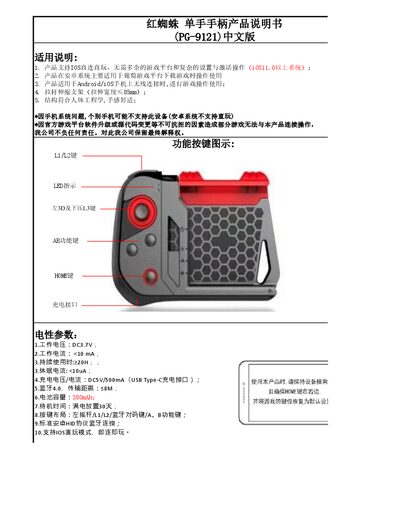
The PG-9121 controller is a compact, ergonomically designed single‑hand gamepad that connects wirelessly to Android and iOS smartphones via Bluetooth 4.0. It features a left joystick, L1/L2 buttons, a Bluetooth pairing key, and A/B function keys, with a USB‑C charging port.
The manual explains how to pair the controller in iOS direct‑play mode (B + HOME) or Android HID mode (A + HOME), outlines power‑saving behavior such as automatic shutdown after 10 minutes of inactivity, and provides safety and compatibility notes for various mobile platforms. This manual is written in Chinese.
| Working voltage | DC3.7V |
|---|---|
| Working current | <10 mA |
| Sleep current | <10 µA |
| Charging voltage / current | DC5V / 500 mA |
| Transmission distance | ≤8 m |
| Battery capacity | 380 mAh |
| Standby time (no use) | 30 days |
| Continuous usage time | ≥20 h |
| Button layout | Left joystick, L1, L2, Bluetooth pairing key, A, B |
| Charging interface | USB Type‑C |
Press B + HOME for 2 seconds to enter V3 direct‑play mode; the LED1 flashes, then select “PG‑9121” on the phone to connect.
Press A + HOME for 2 seconds to enter Android pairing mode; the LED2 flashes, then select “PG‑9121” on the device to connect.
The controller automatically powers off after 10 minutes of no button activity.
It can operate for at least 20 hours of continuous use.