
Anritsu Corporation Signal Analyzer Installation Guide for models MS2830A, MS2840A, MS2850A, MS2690A, MS2691A and MS2692A.
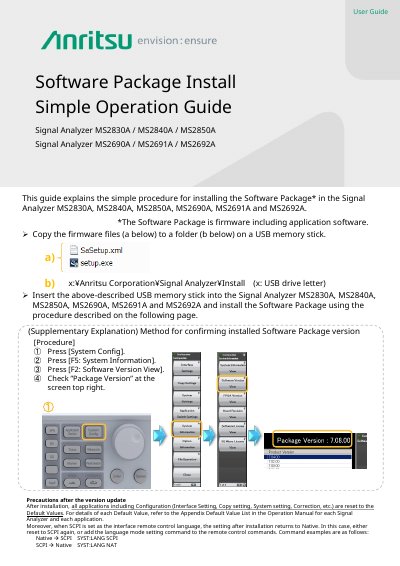
This two-page Anritsu User Guide, titled "Software Package Install Simple Operation Guide," describes the simple procedure for installing the Software Package (firmware including application software) in the Signal Analyzer MS2830A, MS2840A, MS2850A, MS2690A, MS2691A and MS2692A. It shows how to copy the firmware files SaSetup.xml and setup.exe to the folder X:\Anritsu Corporation\Signal Analyzer\Install on a USB memory stick, then insert the stick into the analyzer and run the installation.
The guide gives the button-by-button procedure (System Config, page selection, Software Install, selecting the USB drive letter, Install, Yes, Enter), after which firmware installation starts and the unit restarts automatically. It also includes a supplementary procedure for confirming the installed Software Package version via System Config > System Information > Software Version View, plus precautions after the update: all applications are reset to default values and the SCPI remote control language setting returns to Native, with example commands SYST:LANG SCPI and SYST:LANG NAT.
| Applicable models | Signal Analyzer MS2830A, MS2840A, MS2850A, MS2690A, MS2691A, MS2692A |
|---|---|
| USB folder path | X:\Anritsu Corporation\Signal Analyzer\Install |
| Document number | MS2830A-E-2-5-(4.00) |
Copy SaSetup.xml and setup.exe to the folder X:\Anritsu Corporation\Signal Analyzer\Install on a USB memory stick, insert it into the analyzer, then press System Config, go to page 1, press Software Install, select the USB drive letter, press Install and confirm with Yes and Enter.
Either reset to SCPI again or add the language mode setting command, for example SYST:LANG SCPI for Native to SCPI.