
This product is a PWM charge controller with USB output, adopting the most advanced digital technique. It is an easy operation and cost efficient controller featured with: 3-Stage intelligent PWM charging: Bulk, Boost/Equalize, Float Support 3 charging options: Sealed, Gel, and Flooded Battery status LED indicator indicates battery situation Battery temperature compensation function USB will provide power supply that can charge relevant electronic equipment Battery type and load output can be set via button Extensive Electronic protection
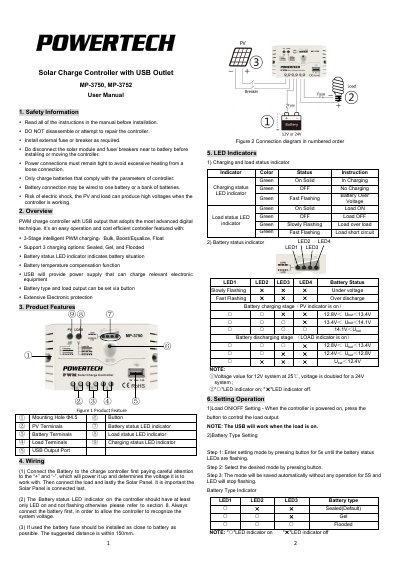
The MP-3750 and MP-3752 are PWM solar charge controllers with a USB output. They use 3-stage intelligent PWM charging and support Sealed, Gel, and Flooded battery types.
The manual covers safety information, product features, wiring, LED indicators, setting operation, protection, troubleshooting, technical specifications, and package contents.
| Nominal system voltage | 12/24VDC Auto |
|---|---|
| Rated charge current | 10A (MP-3750), 20A (MP-3752) |
| Rated discharge current | 10A (MP-3750), 20A (MP-3752) |
| Battery input voltage range | 8V~32V |
| Max. PV open circuit voltage | 50V |
| USB output port | 5VDC/1.2A |
| Working environment temperature | -35 ºC ~ +55 ºC |
| Enclosure | IP20 |
| Overall dimension | 120.3x67x 21.8mm (MP-3750), 148x85.6x 34.8mm (MP-3752) |
| Net weight | 0.10kg (MP-3750), 0.18kg (MP-3752) |
It supports Sealed, Gel, and Flooded battery types.
Press the button for 5 seconds until the battery status LEDs flash, then select the mode.
The load is switched off when a 1.25 times rated current overload occurs. Reduce the load, then press the button or repower the controller.
The controller can start up at a minimum battery voltage of 8V.